Introduction
An AI mobile DVR system combines video recording, vehicle data, cellular communication and driver-assistance functions in one mobile platform. When the components are properly matched, fleet operators and command centers can review incidents, locate vehicles, receive event alerts and inspect live or recorded video. When the system is specified only by a list of features, common problems appear: incompatible cameras, unreliable power, excessive mobile-data use, missing event evidence or alerts that drivers and managers do not trust.
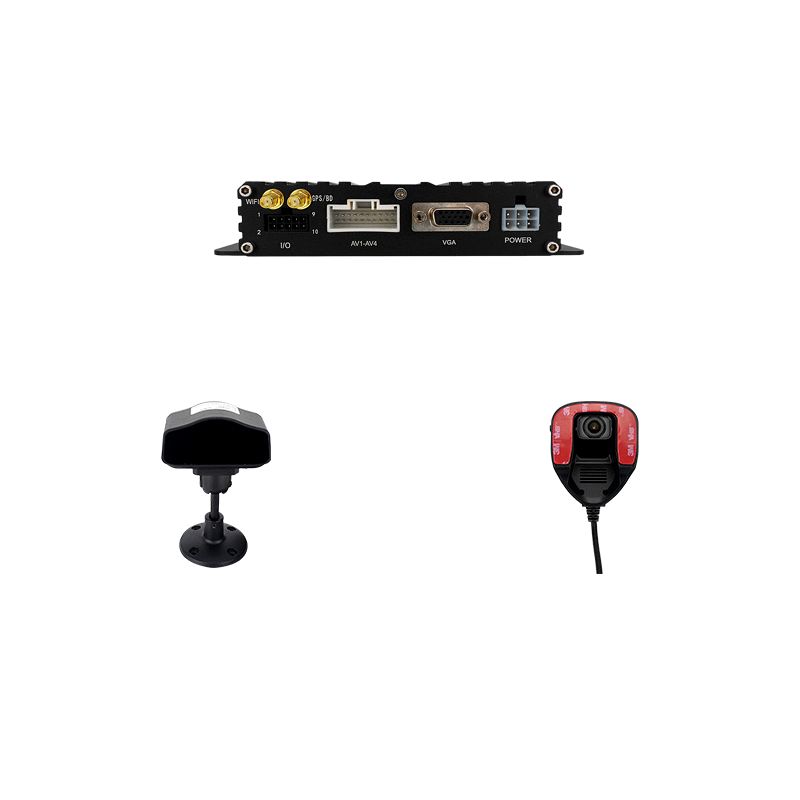
The central unit is normally called an MDVR, mobile DVR or mobile NVR. A typical system may connect four or more cameras, GPS, 4G, Wi-Fi, audio, vehicle I/O, storage, an in-cab monitor and a remote fleet platform. AI models may support ADAS functions looking toward the road and DSM functions observing the driver. Some systems also analyze blind spots, passenger areas or cargo activity.
This guide explains how to plan the complete system rather than buy isolated components. It is intended for commercial fleet operators, vehicle manufacturers, system integrators, distributors, school-bus and public-transport contractors, logistics companies and special-vehicle project teams.
Quick Answer: What Does a Complete AI MDVR System Include?
A practical project normally needs:
- An automotive-grade MDVR with enough video channels.
- Road-facing, cabin, side, rear or cargo cameras selected for each view.
- ADAS and DSM cameras or AI-capable channels where required.
- Local storage sized for the target recording duration.
- GPS and cellular communication for fleet visibility.
- Vehicle power protection and ignition-controlled shutdown.
- A server or cloud platform for live view, playback, events and device management.
- Installation drawings, calibration procedures and acceptance tests.
The system should be designed from the operational requirement backward. Do not begin with "4-channel" or "8-channel" until the required views and AI functions are defined.
1. Define the Business and Safety Objectives
AI functions should solve a measurable fleet problem. Different buyers may prioritize:
- Evidence for collision investigation.
- Driver coaching and risk reduction.
- Remote monitoring of high-value or hazardous cargo.
- Route and vehicle-location visibility.
- Passenger safety and service-quality review.
- Detection of fatigue, distraction or phone use.
- Forward-collision or lane-departure warnings.
- Monitoring of doors, loading areas or blind spots.
- Emergency live video from public-safety vehicles.
Rank these goals. A system optimized for post-incident evidence can use different data, camera and alert settings from a system intended for real-time intervention.
Also define who will use each output. Drivers may receive in-cab audio warnings. Fleet supervisors may receive event clips. Investigators may need high-quality recordings and synchronized vehicle data. IT teams may need device-health alerts and controlled firmware updates.
2. Select the MDVR Architecture
Channel count
A four-channel AI MDVR is a practical starting point for many trucks, vans and small buses. A common layout is:
- Channel 1: road-facing ADAS camera.
- Channel 2: driver-facing DSM camera.
- Channel 3: rear camera.
- Channel 4: cargo, passenger or side-view camera.
Larger buses, construction vehicles and multi-angle security applications may require eight channels or more. Leave room for future cameras if the vehicle design and budget allow.
Analog HD or IP cameras
Automotive analog HD cameras can provide straightforward wiring and predictable latency. IP cameras offer network flexibility, higher resolution options and easier integration with some advanced systems. The MDVR must support the exact signal format, resolution and frame rate.
Do not assume a connector shape proves compatibility. Confirm video standard, pin definition, power delivery and audio support. For IP channels, confirm addressing, authentication, codec and ONVIF or proprietary integration requirements.
Recording resolution and frame rate
Select settings according to the evidence requirement. Higher resolution and frame rate improve detail and motion representation but increase storage, heat and data-transfer load. Many fleets record locally at a higher main-stream quality and transmit a lower-bitrate sub-stream for live viewing.
Specify the required combination for every channel. An MDVR headline may state a maximum resolution that is not available on all channels simultaneously.
3. Plan Camera Positions and Fields of View
Camera selection begins with the evidence each view must capture.
Road-facing camera
The road camera should show lane position, traffic movement and relevant events without excessive dashboard or sky. For ADAS, installation height, pitch, yaw and calibration parameters matter. A wide lens captures more context but reduces distant detail; a narrow lens may miss adjacent lanes.
Driver-facing DSM camera
The DSM camera must see the driver's face under daytime, nighttime and sunglasses or cap conditions anticipated by the project. Infrared illumination can support night operation, but reflections and camera angle require testing. Mounting should not obstruct the driver's view or create an unsafe protrusion.
Side, rear and cargo cameras
Exterior cameras need suitable ingress protection, connectors and mounting. Rear cameras may prioritize a wide view and low latency. Cargo cameras may need infrared illumination and tamper-resistant installation. Passenger cameras should be positioned with privacy policy and local law in mind.
Installation preparation
Before drilling or routing cable, create a vehicle-specific drawing showing camera position, field of view, cable path, MDVR location, antennas, monitor and power connection. Confirm that doors, hydraulic equipment and service panels will not damage or block the cameras.
4. Understand ADAS Functions and Limitations
ADAS in an AI MDVR commonly refers to forward-looking video analysis that may detect lane departure, unsafe following distance, forward-collision risk or pedestrians, depending on the product and configuration.
These functions are driver-assistance tools, not autonomous-driving systems. Performance can be affected by poor calibration, dirty windows, rain, fog, glare, road markings, unusual vehicles and low contrast. Warning thresholds that are too sensitive can cause repeated false alerts; thresholds that are too relaxed may miss useful coaching events.
During evaluation, ask:
- Which functions run on the device and which require the platform?
- What vehicle-speed input is used?
- Is calibration required for each vehicle?
- Can event thresholds be adjusted by vehicle type?
- Is a short event video stored before and after the trigger?
- Can events be reviewed and reclassified by a supervisor?
- How are false positives recorded and used to improve configuration?
A controlled pilot on representative routes is more valuable than a demonstration on one clear road.
5. Understand DSM Functions and Driver Acceptance
DSM may detect fatigue indicators, distraction, phone use, smoking, camera obstruction or the absence of a visible driver, depending on the selected model. Some products provide local audio warnings, platform alerts and event clips.
Driver acceptance is a project requirement, not merely a communication issue. Explain what the system records, why events are collected, who can access them and how long they are retained. Configure alerts around a documented safety policy rather than using every available event by default.
Technical testing should include drivers of different heights, seating positions, glasses and expected lighting conditions. Check morning and evening sunlight, nighttime infrared behavior and vibration. If the camera loses a face because the seat moves, the mounting or calibration needs revision.
Mid-article CTA — Send Your Fleet Requirements
Share the vehicle type, number of cameras, required ADAS/DSM events, storage days and target platform functions. SOWZE can prepare a matching AI MDVR configuration for review.
6. Calculate Storage Correctly
Storage depends on channel count, resolution, frame rate, codec, bitrate, recording schedule and event retention. A simplified estimate is:
Storage per day = total bitrate in Mbps × 10.8 GB
For example, four channels averaging 1.5 Mbps each produce a combined bitrate of 6 Mbps. Continuous recording would require roughly 64.8 GB per day before allowing for file-system overhead, bitrate variation and reserved capacity. Seven days could therefore require more than 450 GB.
This is an estimate, not a guarantee. Variable bitrate changes with scene complexity, night noise and vehicle movement. Run a representative recording test and inspect actual consumption.
HDD, SSD or SD card
Hard drives offer economical capacity but require effective shock and vibration protection. SSDs tolerate movement better and provide fast access, but cost more per unit of capacity. SD cards can be useful for backup, event recording or compact systems, provided endurance and replacement procedures are considered.
Confirm:
- Maximum supported capacity and approved media list.
- Vibration protection and storage mounting.
- Automatic overwrite behavior.
- Disk-health monitoring.
- Encryption requirement.
- Safe removal and evidence-export process.
7. Design 4G, Wi-Fi and GPS Connectivity
Cellular connectivity enables live view, GPS tracking, event upload and device management, but mobile networks are variable. The project should continue recording locally when coverage is unavailable and upload selected data after reconnection.
Control mobile-data use
Continuous high-resolution live video can consume substantial data. Use sub-streams, event-based uploads, user permissions and time limits. Platform administrators should be able to see which users or workflows are generating traffic.
Antenna installation
GPS, cellular and Wi-Fi antennas need appropriate placement and separation. Metal vehicle bodies can block signals. Avoid routing antenna cables beside high-current or noisy electrical equipment. Confirm connector type and cable length before installation.
SIM and regional compatibility
Verify supported frequency bands for the destination country and selected mobile operator. "4G supported" does not mean every regional band or carrier has been validated. For roaming or multi-country fleets, discuss SIM management and platform connectivity in advance.
8. Protect the System from Vehicle Power Conditions
An MDVR normally connects to battery power and an ignition signal. It may continue recording for a configured period after the ignition is switched off, then shut down safely to protect storage and prevent battery drain.
The electrical design should include:
- Supported 12V or 24V input range.
- Low-voltage and over-voltage protection.
- Reverse-polarity and surge protection.
- Correct fuse location and rating.
- Ignition detection and delayed shutdown.
- Peak load for cameras, monitor and accessories.
- Grounding strategy and noise control.
Do not take power from an undocumented circuit because it is physically nearby. Obtain the vehicle builder's approval, especially for buses, emergency vehicles and equipment under warranty.
9. Evaluate the Fleet Platform
The platform determines whether recorded data becomes operationally useful. A technical demonstration should include actual workflows, not only a map screen.
Evaluate:
- Vehicle list, map and status information.
- Live video and multi-channel switching.
- Remote playback and clip download.
- ADAS/DSM event review.
- Alarm acknowledgement and escalation.
- Device, disk, camera and network health.
- User roles and audit logs.
- Fleet grouping and customer separation.
- Report export and API availability.
- Server deployment, backup and retention.
For distributors serving multiple customers, confirm whether the platform supports tenant separation, branding and delegated administration. For private deployment, confirm server specifications, database backup, security updates and remote-support boundaries.
10. Plan Cybersecurity and Access Control
Vehicle video may contain personal, operational or security-sensitive information. Use unique passwords, role-based access and encrypted connections where supported. Disable unused services and avoid exposing device ports directly to the public internet.
Request a documented firmware update process. Record the approved firmware version during factory inspection and vehicle commissioning. Updates should be tested on a small group before fleet-wide deployment.
The project owner should define:
- Who can view live video.
- Who can export evidence.
- How long recordings and events are retained.
- How departed employees lose access.
- How audit records are reviewed.
- How devices and credentials are handled when vehicles are sold or reassigned.
Local privacy and employment requirements vary, so obtain suitable legal and policy advice for the destination market.
11. Run a Representative Pilot
A pilot should include the actual vehicle type, routes, drivers, network and management team. One parked demonstration cannot reveal vibration, sunlight, network gaps, alert fatigue or storage behavior.
Use a written test plan covering:
- Day and night video from every camera.
- Number plate and incident detail at realistic distances.
- ADAS calibration and event accuracy.
- DSM performance with representative drivers.
- GPS accuracy and route history.
- 4G reconnection after coverage loss.
- Local recording while offline.
- Event upload and notification delay.
- Ignition shutdown and battery protection.
- Storage duration and overwrite behavior.
- Remote playback and evidence export.
- Device-health and camera-loss alerts.
Record false alerts and missed events. Adjust installation and thresholds before judging the hardware. The goal is not to produce zero alerts; it is to produce events that support a clear fleet workflow.
12. Factory Testing and Pre-Shipment Inspection
For a sample or production order, define the inspection scope before manufacturing is complete.
MDVR functional test
- Verify model, channel count and communication module.
- Test all video and audio inputs.
- Confirm recording at required settings.
- Check GPS, 4G and Wi-Fi functions.
- Test ignition, delayed shutdown and restart.
- Verify disk detection and storage health.
- Confirm alarm inputs and outputs where used.
- Record firmware and configuration version.
Camera and accessory inspection
- Confirm lens angle and camera type for each mounting position.
- Inspect connectors, pin definitions and cable lengths.
- Test infrared illumination and microphone where applicable.
- Verify brackets, antennas, monitor and control accessories.
- Check labels, serial numbers and packaging.
Shipment documentation
The shipment file can include packing list, serial-number list, configuration backup, wiring diagram, installation guide and inspection photos. This reduces confusion when different teams purchase, install and commission the system.
13. Commission the First Vehicles Carefully
During installation, photograph camera positions and cable routes. Label both ends of cables. Protect connectors from water and strain. Mount the MDVR where it has ventilation, service access and protection from passengers, cargo and cleaning water.
After installation:
- Confirm every camera view with the vehicle loaded as it will operate.
- Calibrate ADAS on appropriate level ground according to the product procedure.
- Adjust DSM for the real driver position.
- Confirm antenna signals and platform connection.
- Simulate ignition shutdown and network loss.
- Export a test video and event clip.
- Train the driver and fleet supervisor.
- Save the final configuration by vehicle number.
Use the first vehicles to refine the installation standard before scaling to the full fleet.
Common Procurement Mistakes
Buying AI labels without defining events
Specify which ADAS and DSM functions are required, how alerts will be used and what evidence must be stored.
Ignoring regional 4G bands
Confirm the modem and antennas for the destination operator and market.
Underestimating storage
Calculate using all channels and representative bitrate, then add engineering margin.
Treating cameras as interchangeable
Lens angle, connector pinout, signal format, infrared behavior and mounting differ by position.
Skipping driver and supervisor workflow design
Alerts that no one reviews do not create value. Excessive warnings can reduce trust.
Scaling before completing a pilot
A controlled pilot identifies vehicle-specific installation and configuration problems before they affect the whole fleet.
AI MDVR Request-for-Quotation Checklist
Provide suppliers with:
- Vehicle type and fleet quantity.
- Required camera views and channel count.
- Video resolution and recording days.
- ADAS and DSM event requirements.
- Local warning and platform-alert requirements.
- GPS, 4G, Wi-Fi and regional frequency bands.
- Live-view and event-upload expectations.
- Storage media preference.
- Platform deployment and user count.
- API or third-party integration requirement.
- Input voltage and ignition behavior.
- Monitor, intercom, panic button and I/O needs.
- Certifications and destination market.
- OEM branding and documentation.
- Pilot, factory inspection and delivery schedule.
FAQ
What is the difference between an MDVR and an AI MDVR?
A standard MDVR records vehicle video and may provide GPS and cellular access. An AI MDVR also processes supported video events such as ADAS or DSM detections, either in the recorder, camera or connected platform. Functions vary by model.
Is a four-channel mobile DVR enough for a truck or van?
It can be enough for road, driver, rear and cargo or side views. Vehicles needing full surrounding coverage, passenger monitoring or multiple blind-spot cameras may require more channels.
How many days can an AI MDVR record?
Recording time depends on channel count, bitrate, codec, schedule and storage capacity. Calculate an estimate, then confirm it with representative test recordings because variable bitrate changes with the scene.
Does an AI MDVR need continuous 4G coverage?
No. A properly designed system records locally when the network is unavailable. 4G is used for live viewing, GPS, events, playback or management, and selected data can upload after reconnection.
Can ADAS and DSM eliminate accidents?
No. They are assistance and risk-management tools, not guarantees. Their value depends on installation, calibration, operating conditions, driver policy and how the fleet responds to events.
What information should I send for an AI MDVR quote?
Send vehicle type, quantity, camera views, required AI events, recording days, cellular market, platform functions, voltage and installation schedule.
Conclusion
A reliable AI mobile DVR project is built from a complete workflow: the right camera views, compatible recording hardware, calibrated ADAS and DSM, sufficient storage, controlled cellular use, protected vehicle power and a platform that supervisors can actually operate.
Start with business and safety objectives, run a representative pilot, document installation and inspect the shipment against agreed requirements. This approach produces more dependable results than selecting a recorder from a feature table and solving compatibility problems after delivery.
Final CTA — Request an AI MDVR System Proposal
Send SOWZE your vehicle type, fleet quantity, camera layout, AI-event requirements and target country. Our team can prepare a suitable MDVR, camera, storage and platform configuration for technical review.
Turn your requirements into a workable system.
Share the vehicle, target distance and project market. SOWZE will help identify a practical product configuration.