Plug-and-Play Setup
Automatically add compatible IP devices and distribute IP addresses for faster deployment.
A plug-and-play network PTZ controller with ONVIF 2.4 compatibility, a responsive 3D joystick, integrated color display and HDMI/USB connectivity for professional monitoring workstations.
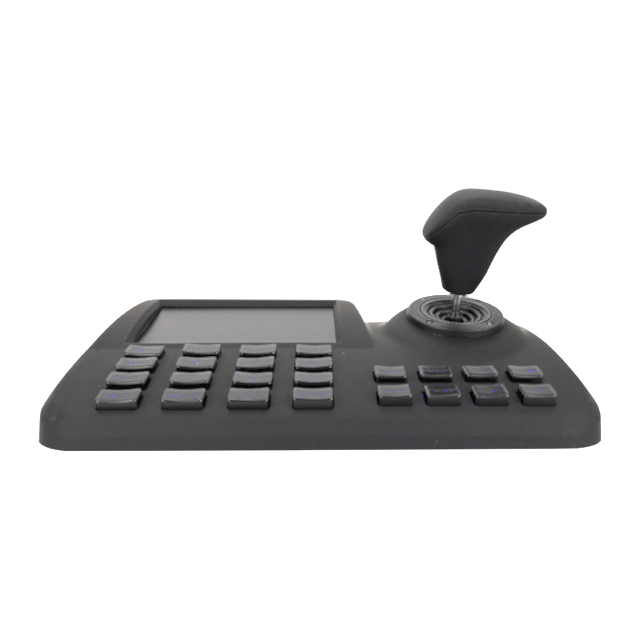
| Model | SW-NK305TP |
|---|---|
| Product Type | ONVIF network keyboard and joystick controller |
| ONVIF Version | ONVIF 2.4 |
| Control Method | Network |
| Joystick | 3D vector variable-speed joystick |
| Display | 5-inch color LED display |
| Camera Capacity | No fixed limit; single-camera display |
| IP Setup | Plug and play with automatic IP address addition and allocation |
| Video Output | 1 × HDMI |
| USB | 1 × USB |
| Network Interface | 1 × RJ45 |
| Serial Interface | 2 × RS485 reserved |
| Baud Rate | 9600 bps |
| Communication Distance | Depends on network cabling and architecture |
| OSD Language | English |
| Power Supply | DC 12 V / 2000 mA |
| Operating Temperature | -20°C to +55°C |
| Operating Humidity | Up to 90%, non-condensing |
| Dimensions | 260 × 160 × 48 mm |
Automatically add compatible IP devices and distribute IP addresses for faster deployment.
Use a variable-speed joystick for smooth, proportional pan, tilt and zoom operation.
View system information and camera control status directly from the operator console.
Connect external displays and accessories through integrated HDMI and USB interfaces.
Operate ONVIF PTZ cameras from a dedicated physical console with responsive joystick control.
Give command vehicle and temporary control-center operators direct access to live PTZ positioning.
Control network cameras across sites, plants and infrastructure monitoring workstations.
The SW-NK305TP supports ONVIF 2.4 for compatible network PTZ camera control.
Yes. It supports plug-and-play camera addition and automatic IP address allocation.
Yes. The controller provides an HDMI output and also includes a USB interface.
Send your camera models, network architecture and project quantity. We will help verify compatibility and the appropriate controller configuration.